Recommended
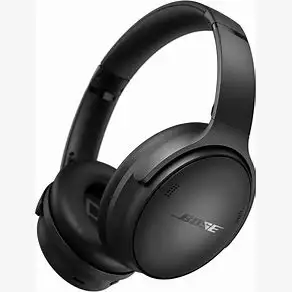
High quality noise-cancelling headphones.
Introduction
I recently had the good fortune of acquiring a pair of Bose QuietComfort Headphones from a work event. Needless to say, I was excited to try them out. Unsurprisingly, the headphones lived up to the high expectations that come with a Bose product.
You can find reviews of Bose products all over the web, and they all say the same thing: Bose makes a high-quality product, and their headphones have excellent noise cancellation. Rather than duplicate the same content, I’ll try to add some details you might not find as easily.
The Good Stuff
High Quality Audio
For my taste, the Bose QuietComfort has a well-balanced sound right out-of-the-box. There is an EQ tool in the app so you can fine-tune the sound if you prefer. I played with it for a while, but ultimately I ended up resetting back to the default.
Excellent Noise Cancellation
I have other noise cancelling headphones, but one thing that stood out to me very early was the wind cancellation. While my other struggle when there is wind, these headphones remained quiet.
The noise cancellation on these headphones is so good, actually, that I get the feeling of pressure in my ears when there isn’t much external noise. As a result, I usually listen with the noise cancellation off unless there is something to actively block out.
Comfortable
Any premium headphones should be comfortable, and these meet that standard. I wear glasses, and the padding remains comfortable over the frames. I can easily wear them for several hours at a time. Impressively, even the noise cancellation is not affected by my glasses.
High Quality Construction
Both the hardware and software are well-built. The headphones do not feel like they are made of cheap materials, they are easy to pair to Bluetooth, and the app is straight forward. I haven’t had the headphones long enough to determine how well they’ll wear, but I have high expectations.
The microphone has no trouble picking up my voice and I have been able to seamlessly use these headphones for virtual meetings. The headphones also come with an auxiliary cable with built-in microphone in case you need a wired connection.
Shortcomings
Old-School Buttons
My biggest disappointment with these headphones is the buttons. They simply aren’t exciting. There is a slider on the side to turn on the headphones. There are three buttons for volume and playback control, and an action button for changing the noise cancelling mode or running a custom action. The action button only has two options: check the batter life or open Spotify.
While I admire sticking with the tried-and-true approach, I have never liked having buttons that perform multiple actions because I can never remember how many times click or if I need to hold the button. Sony’s touch controls are far superior.
Fewer Features Than Sony
While we’re on the subject, on my Sony headphones I rather enjoy placing my hand over one earphone to temporarily disable the noise cancellation. Sadly, there is no equivalent feature on Bose. Additionally, while Bose does allow you to create custom noise cancellation profiles, the only option is how much noise to block. It lacks the ability to selectively allow noise, like blocking ambient noise while allowing speech.
How I Use It
At the moment I am using these headphones for both business and pleasure. They are equally versatile for calls and music. The battery life is strong enough to easily last a full workday or long flight. Combined with the comfort, sound quality, and ease-of-use these headphones are my go-to for every occasion.
An Additional Add-On
Regardless of the headphones you own, be sure to check out this Lamicall Headphone Mount. I attached a couple to my desk a few years ago, and they are still firmly fixed. I like the swivels that allows this mount to be installed just about anywhere, and the attached cable organizers are not a bad addition either.
Leave a Reply